- Page d'accueil /
- Mobile Phone Accessories /
- Accessoires /
- Stylus Pens /
- Paperlike Pencil Tips 4X for Apple Pencil 1st & 2nd Gen...
0 ratings

Numéro d'article:
148159563
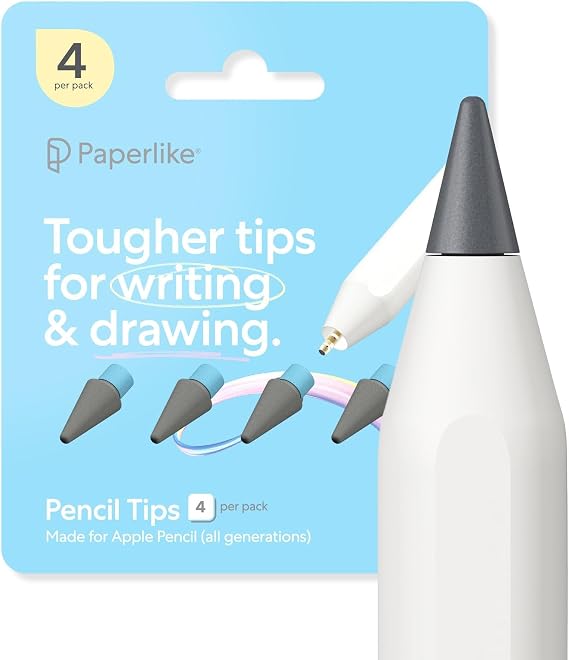
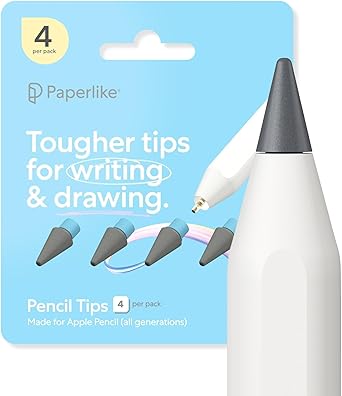
Paperlike Pencil Tips 4X for Apple Pencil 1st & 2nd Gen, USB-C & Pro 10x More Durable, Subtle Boost in Control on Paper-Feel Screen Protectors
90% des répondants recommanderaient ceci à un ami
Numéro d'article:
148159563
€ 28
Price Details
Excluding Shipping & Custom charges ( Shipping and custom charges will be calculated on checkout )
*All items will import from États-Unis
0 ratings
Écrire un commentaire
En stock
 Importé depuis la boutique USA
QTY:
Commandez maintenant et recevez votre commande aux alentours du Jeudi, Juin 25
Transaction sécurisée
Ubuy s'engage à protéger votre sécurité et votre confidentialité. Notre système avancé de sécurité des paiements garantit la confidentialité en chiffrant vos informations lors de la transmission grâce aux protocoles AES (Advanced Encryption Standards) et SSL (Secure Socket Layer). Vos coordonnées de paiement sont 100 % sécurisées car nous ne partageons pas vos informations de paiement avec des vendeurs tiers.
nos meilleurs partenaires logistiques


A Pencil Tip youʼll want to write home about.

Achetez maintenant payez plus tard

Livraison
rapide

Retour
gratuit*

Emballage sécurisé

Produits 100 % originaux

Conformité PCI DSS

Certifié ISO 27001


Note: Step Down Voltage Transformer required for using electronics products of États-Unis store (110-120). Recommended power converters Acheter maintenant.


Ce qui se démarque
Increased Durability
These pencil tips offer ten times more durability, ensuring longevity and consistent performance during use, reducing the frequency of replacements compared to standard tips.
Enhanced Control
Designed for paper-feel screen protectors, these tips provide a subtle boost in control, mimicking the feel of traditional writing, perfect for artists and note-takers seeking precision.
Compatibility
Compatible with both Apple Pencil generations, USB-C, and Pro models, these tips are versatile, catering to a wide range of devices and enhancing productivity for various users.
Détails du produit
| Compatible Devices | Apple Pencil |
| Item Dimensions | 0.51 x 0.2 x 0.2 inches (1.3 x 0.5 x 0.5 cm) |
| Color | Charcoal/Blue |
| Enclosure Material | Synthenic |
| Brand | Paperlike |
| Model Number | PL-APT-CB-25 |
| Are Batteries Included | No |
| Are Batteries Required | No |
| Unit Count | 4.0 Count |
| Manufacturer | Paperlike |
| Mfr Part Number | PL-APT-CB-25 |
| Built-In Media | Pencil Tips |
| Material | Synthenic |
| Item dimensions L x W x H | 0.51 x 0.2 x 0.2 inches (1.3 x 0.5 x 0.5 cm) |
| Batteries Required? | No |
| Number of Packs | 4 |
| Package Weight | 1 Pound (450 grams) |
À qui est-ce destiné ?

-
Artists and Illustrators
These tips enhance precision, making them ideal for artists seeking a natural paper-like drawing experience.
-
Students Taking Notes
The tips provide better control and accuracy, ideal for students using Apple Pencil for note-taking on digital platforms.
-
Design Professionals
Designers will appreciate the added durability and control while creating detailed work on screen protectors.

-
Casual Users
Individuals who use the Apple Pencil lightly won't need the enhanced durability these tips provide.
-
Non-Drawing Tasks
Users primarily doing basic navigation or text input may not benefit from these specialized pencil tips.
-
Budget-Conscious Buyers
Those looking for a more economical option may find these premium tips to be an unnecessary expense.
DESCRIPTION DU PRODUIT
Paperlike Pencil Tips 4X for Apple Pencil 1st & 2nd Gen, USB-C & Pro 10x More Durable, Subtle Boost in Control on Paper-Feel Screen Protectors
Vous avez une question ? Chattez avec nous
Questions et réponses des clients
-
question:
What are the benefits of using Paperlike Pencil Tips for Apple Pencil?
répondre: Paperlike Pencil Tips offer a tactile experience that mimics writing on paper, making it ideal for artists and note-takers. These tips provide a subtle boost in control, enhancing precision, especially during detailed sketches or fine writing. Additionally, they are designed to be 10 times more durable than standard tips, reducing the frequency of replacements, which is beneficial for heavy users who rely on their Apple Pencil for daily tasks. -
question:
How do the Paperlike Pencil Tips improve drawing and writing accuracy?
répondre: The Paperlike Pencil Tips create a textured surface that increases friction between the tip and the screen, resulting in improved control. This tactile feedback allows users to make finer adjustments in their strokes, whether they are drawing intricate designs or jotting down notes. Many users report a more natural drawing feeling, akin to using traditional media, making these tips perfect for artists transitioning to digital platforms. -
question:
Are the Paperlike Pencil Tips compatible with both Apple Pencil 1st and 2nd generation?
répondre: Yes, the Paperlike Pencil Tips are specially designed to be compatible with both the Apple Pencil 1st and 2nd generation. This versatility means that users can enjoy the improved control and durability, regardless of which version of the Apple Pencil they own. Whether you are sketching on an iPad or taking notes on a tablet, these tips provide a seamless experience across devices. -
question:
Will using the Paperlike Pencil Tips affect screen sensitivity?
répondre: Using Paperlike Pencil Tips does not negatively impact screen sensitivity; in fact, many users find that it enhances their interaction with the screen. The tips are engineered to maintain responsiveness while providing a grippy surface. As a result, users can enjoy a comfortable experience without sacrificing performance, making it a popular choice for tasks that require both creativity and precision. -
question:
Can I use Paperlike Pencil Tips on other devices aside from the iPad?
répondre: While specifically designed for Apple Pencil users, Paperlike Pencil Tips are generally compatible with any device that supports the Apple Pencil, including various models of iPads and future devices. If you are using a compatible stylus with a similar architecture, you might also benefit from these tips. This versatility allows artists and professionals to leverage their tools effectively across different platforms. -
question:
How long do the Paperlike Pencil Tips last compared to standard tips?
répondre: Paperlike Pencil Tips are engineered for durability and are reported to last up to 10 times longer than standard tips. This extended lifespan makes them a cost-effective choice in the long run, especially for those who frequently replace their stylus tips due to wear and tear. Users appreciate this longevity, particularly when using their Apple Pencil extensively for art, design, or note-taking. -
question:
Are Paperlike Pencil Tips easy to install on the Apple Pencil?
répondre: Yes, installing Paperlike Pencil Tips is straightforward and requires no specialized tools. Simply unscrew the old tip from your Apple Pencil and replace it with the new Paperlike tip. The secure fit ensures that there’s no wobble, allowing for a dependable and consistent drawing experience. Users enjoy this hassle-free process, enabling them to quickly get back to their creative endeavors. -
question:
Do Paperlike Pencil Tips create a noise when drawing?
répondre: Paperlike Pencil Tips are designed to minimize noise while providing a satisfying tactile feedback. While there may be a soft sound when the tip glides over the screen, many users find it less distracting than other materials. This quality makes it an appealing option for those who prefer a quieter workspace during drawing or while in meetings, enabling focus without unnecessary interruptions. -
question:
Where can I buy Paperlike Pencil Tips in France?
répondre: You can purchase Paperlike Pencil Tips for Apple Pencil at Ubuy in France. Ubuy offers a convenient platform for finding this innovative product, ensuring that you can enhance your digital drawing and note-taking experience without hassle. Be sure to check their stock for availability and explore additional related products that can complement your Apple Pencil. -
question:
Can I use the Paperlike tips for digital art applications?
répondre: Absolutely! Paperlike Pencil Tips are perfect for digital art applications. The enhanced control and paper-like texture enable artists to create fine details with ease. Whether using software like Procreate or Adobe Fresco, these tips offer reliability and comfort, making them a preferred choice among digital illustrators and graphic designers for both professional and casual projects.
Paperlike Stylus Pens PL-APT-CB-25 Editorial Review
The Paperlike Pencil Tips for Apple Pencil (1st & 2nd Gen) have received a mixed reception from users. Primarily aimed at artists and digital illustrators, these nibs are designed to enhance the drawing experience on various textured screens, particularly those mimicking traditional paper. Many users appreciate the added texture provided by these tips, which contributes to a more natural drawing experience akin to that found on professional drawing tablets like Huion or Wacom. Customers have noted that the Paperlike nibs create a satisfying feel while drawing, particularly when paired with specific screen protectors. Users have highlighted their durability compared to previous versions, which incorporated metal inserts that could damage screen protectors. The nibs are generally regarded as aesthetically pleasing, though some have remarked on a desire for alternative colors, such as white. However, there have been significant complaints regarding functionality. Some users experienced inConsistent performance with the new black tips, reporting issues such as skipping or failure to register on the iPad unless used at a particular angle. These problems have led to frustration, with a few users mentioning that reverting back to the standard Apple Pencil tips resolved the issue. In summary, while the Paperlike Pencil Tips offer a promising enhancement for those looking to recreate a traditional drawing feel on their digital devices, the inConsistency in performance has left some users disappointed. Therefore, the overall experience is polarized, with users divided between appreciating the tactile feel and expressing frustration over reliability. **
Avis et évaluations clients
1 évaluations des clients
-
5 étoile
100%
-
4 étoile
0%
-
3 étoile
0%
-
2 étoile
0%
-
1 étoile
0%
Donnez votre avis sur ce produit
Partagez votre avis avec d'autres clients
Avantages
- Enhances drawing texture, creating a paper-like feel
- Durable compared to previous versions
- Aesthetically pleasing design
- Works well with textured screen protectors
Les inconvénients
- Can be frustrating for users with specific drawing techniques
Top selling Paperlike Pencil Tips in France






Last Updated on June 17, 2026
Historique des prix du produit
Informations importantes
- Limitations : Pour les produits expédiés à l'international, veuillez noter que toute garantie du fabricant peut ne pas être valide ; les options de service du fabricant peuvent ne pas être disponibles ; les manuels, instructions et avertissements de sécurité des produits peuvent ne pas être dans les langues du pays de destination ; les produits (et les matériaux qui les accompagnent) peuvent ne pas être conçus conformément aux normes, spécifications et exigences d'étiquetage du pays de destination ; et les produits peuvent ne pas être conformes à la tension et aux autres normes électriques du pays de destination (nécessitant l'utilisation d'un adaptateur ou d'un convertisseur le cas échéant). Il incombe au destinataire de s'assurer que le produit peut être importé légalement dans le pays de destination. En cas de commande auprès d'Ubuy ou de ses filiales, le destinataire est l'importateur officiel et doit se conformer à toutes les lois et réglementations du pays de destination.
- Tous les produits listés sur Ubuy ne sont pas à vendre, Ubuy étant un moteur de recherche mondial. Les produits sont soumis aux réglementations en matière d'exportation et de commerce.
€ 28
Commandez maintenant et recevez votre commande aux alentours du Jeudi, Juin 25
This item is not restrict in my country.(Please click on above link if this item is not restrict in your country, So our team will review and allow.)
QTY:
Transaction sécurisée
Ubuy s'engage à protéger votre sécurité et votre confidentialité. Notre système avancé de sécurité des paiements garantit la confidentialité en chiffrant vos informations lors de la transmission grâce aux protocoles AES (Advanced Encryption Standards) et SSL (Secure Socket Layer). Vos coordonnées de paiement sont 100 % sécurisées car nous ne partageons pas vos informations de paiement avec des vendeurs tiers.
nos meilleurs partenaires logistiques
Livraison transfrontalière la plus rapide
Caractéristiques et avantages
- Compatible with all Apple Pencil versions and Logitech Crayon.
- Durable tips last up to 10x longer than standard Apple Pencil tips.
- Enhances control on textured displays for a better writing experience.
- Smart packaging keeps tips secure and easy to store.
- Perfect for creators and notetakers looking for natural control.
- Lightweight design combines modern aesthetics with functionality.